
-

Instagram Plus APK
Instagram Plus is an upgraded version of Instagram, designed for Android users. A third party made this app. It offers many extra features not found in the official version and provides flexible privacy options. You can download content, zoom in on images, and enjoy other unique features.
| Name | Instagram Plus |
| Latest Version | 10.20.1 |
| Size | 54.9 MB |
| Update on | 1 Hour Ago |
| Compatible with | Android 5.0+ |
| Price | Free |
| Developer | OGmods |
What Is Instagram Plus:
Instagram Plus is a modified version of the official Instagram app. It’s ideal for users who want to go beyond official limits and enjoy more customization options. You can download content, hide your online status, and use automatic chat translation. Also, you can customize the interface, and it supports multiple languages as well to give you more freedom while using it.
Key Features of Instagram Plus:
Content downloading is more convenient
It has a direct download feature. You can save images, videos, Reels, and Stories from posts with just one click. Instagram Plus lets you save your favorite content locally.
Stronger privacy control
Instagram Plus offers privacy options missing in the official version. You can hide your online status to stop others from seeing if you are online. To let you watch others’ dynamic content without them knowing. You can view their Stories invisibly.
View high-definition profile pictures
In Instagram Plus, you can view a user’s HD profile picture by long-pressing their avatar. In the official version, avatars are often cropped and compressed. But Instagram Plus shows personal photos more clearly.
Multi-account switching
You can add multiple accounts on Instagram Plus to make it easy to switch between them quickly.
Cons:
Account security risks
Logging into your Instagram account with this unofficial modified app has risks. The official terms of service prohibit using unauthorized third-party clients. Once abnormalities are detected, your account may be subject to restrictions.
Compatibility issues
When Instagram upgrades, third-party modified versions need some time to adapt. During this period, you may experience issues logging in or functionality errors. Uninstall the official Instagram app first, because Instagram Plus won’t work with it.
No official support
If you have problems using it, you can’t get help from customer service. This will result in fewer channels for obtaining help when issues arise.
Unable to experience new features immediately
Due to the unofficial nature, once new features are released, there is no way to try them out immediately.
Why Instagram Plus is Popular:
Download multimedia content
Save high-definition images and videos to your local album with one click. There’s no need for screenshots or extra tools.
No ads
Instagram Plus completely removes feed ads.
Increased privacy
You can browse stories anonymously and hide your active status.
Customizable interface
Supports customizing your theme and changing font sizes.
Who Should Use Instagram Plus:
Dislike ad interference
For a smooth feed experience without ads, try Instagram Plus. It filters out promotions so you can scroll freely.
Many account management
If you manage several Instagram accounts for work, you can switch between them easily in the app. Instagram Plus can manage more accounts than the official version, and gets around device limits.
Privacy-conscious users
You can hide when you’ve seen someone’s story or are typing in group chats.
Instagram Plus Screenshots:

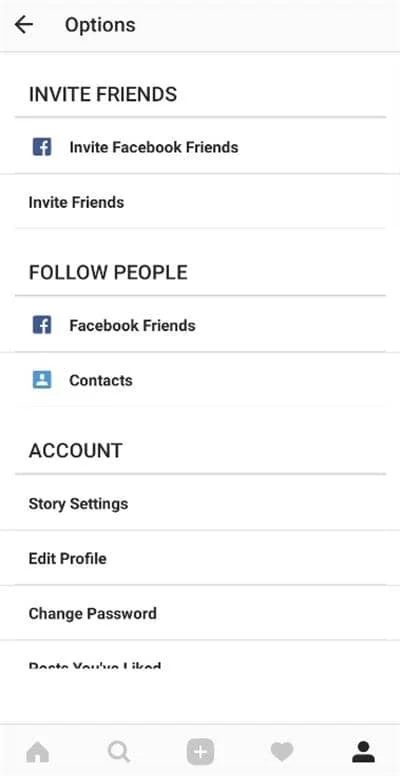
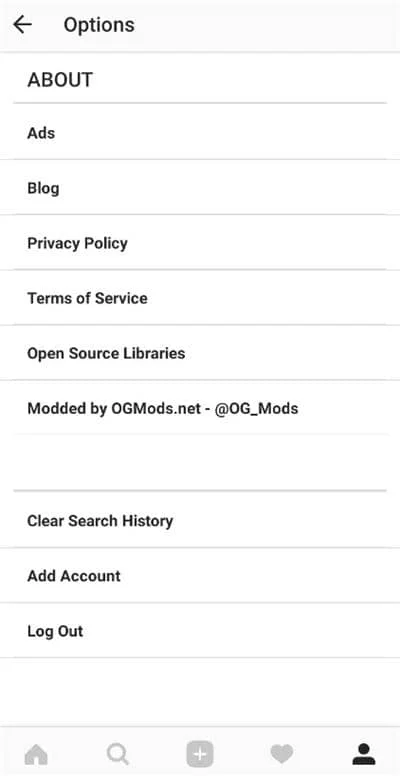
Tips for Using Instagram Plus:
Backup account data
Before installation, it is recommended that you back up important data.
Uninstall the official version before installing
Uninstall the official Instagram app before installing Instagram Plus to help avoid any conflicts. If you want to keep the official version, you can choose to install Insta Thunder, Insta Ultra or Insta Pro.
Avoid frequent operations
It offers handy features like stealth viewing and bulk unfollowing. But please use it in moderation. For example, avoid unfollowing many accounts at once. Doing this too often can trigger abnormal behavior detection.
Pay attention to account security warnings
Regularly check your account security notifications. If you see any strange activity on your account, log out right away. Then, change your password using official channels to keep your account safe.
About Instagram Plus APK:
Instagram Plus APK is an app built on the original Instagram. It adds many new features while keeping the core functions the same. You can simply understand Instagram Plus APK as an enhanced version of Instagram.
Benefits of Using Instagram Plus APK:
One-click download images and videos
You can save photos and videos to your phone locally by clicking on them while browsing posts.
Download Stories and Reels
Instagram Plus APK lets you download users’ Stories and Reels.
Hide online status
Once you turn on privacy options in settings, your friends can’t see your online status or last login time. You won’t leave any trace while browsing others’ Stories to let you browse in stealth mode.
View high-definition profile pictures
You only need to long-press on the user’s avatar, and Instagram Plus APK will pop up their original size HD avatar.
Ad blocking
Ads and promotions are gone from the feed. Now you can browse without any interruptions.
Videos autoplay with sound
Instagram Plus APK allows you to set videos to autoplay with sound.
Video speed options
When watching long videos or IGTV, it provides a speed playback option.
Batch management follows
Instagram Plus APK lets you analyze your followers. It shows which users you follow who haven’t followed you back. This way, you can clean up your follow list with one click.
How To Install Instagram Plus APK:
- Click the download button on the website, and the Instagram Plus APK will download to your device.
- Enable the Unknown Sources option from your device’s settings. Allow certain necessary access that it requires.
- After installation, open Instagram Plus to start. Then you can log in to your existing Instagram account or create a new account to use.
Difference Between Instagram Plus and Insta Pro 2:
| Feature | Instagram Plus | Insta Pro 2 |
|---|---|---|
| Download Media | Supported Photos, Videos, Reels | Supported All Media Types |
| Ad-Free Experience | Yes | Yes |
| Privacy Options | Hide View Stories, Typing, Read Receipts | Enhanced: Includes Ghost Mode, Anti-Delete |
| Customization | Basic Theme Tweaks | Advanced UI Customization |
| In-App Translation | No | Yes, Multi-language Support |
| Reels and IGTV Download | Yes | Yes |
| Root Required | No | No |
Frequently Asked Questions About Instagram Plus:
No, you need to uninstall the official app to avoid conflicts.
Yes, it is very likely to get your account banned. Instagram’s terms say you can’t use modified versions or helper tools made by others. If the system detects a problem, it may temporarily suspend your account or ban it permanently.
Usually, installing the Instagram Plus APK won’t harm your Instagram data. Still, it’s a good idea to back up important content first.
The problem could be from device compatibility, not uninstalling the official version, or a corrupted APK.








Leave a Reply