

| Name | Insta Thunder |
| Latest Version | 278.0.0.21.117 |
| Size | 59.6 MB |
| Update on | Jul 3, 2025 |
| Compatible with | Android 5.0+ |
| Price | Free |
| Developer | SamMods |
What Is Insta Thunder:
Insta Thunder is a strong tool for Instagram users. It helps them overcome some limitations of the official app. Users can download high-definition images and videos, view hidden content, and block ads. It lets users enjoy Instagram more. They can skip the limits and ads in the official app. In short, Insta Thunder is a better Instagram. It offers more control and lets you customize your experience.
Key Features of Insta Thunder:
Privacy Control
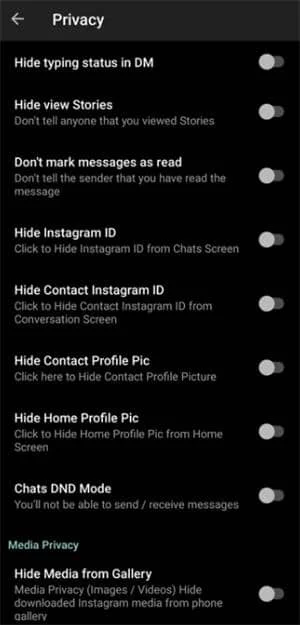
Insta Thunder has strong privacy features. You can turn off read and typing indicators for direct messages. It also hides your viewing history of stories. Additionally, others may not know if you have seen their messages or stories. It also has a built-in app lock, and you can set a PIN to keep your private messages safe from others.
Media Content Download
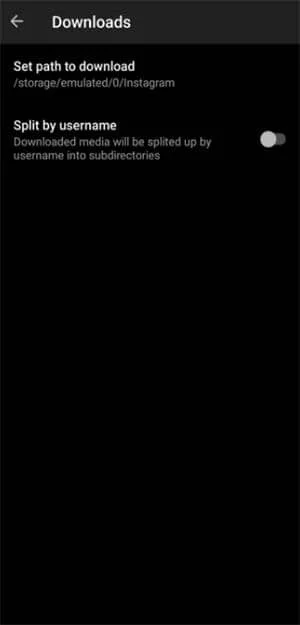
You can directly download images, Reels videos, and stories to your device. All downloaded content is organized and saved on your phone. You can easily save your favorite posts or stories to share. The official version doesn’t let you download them directly.
Ad-Free
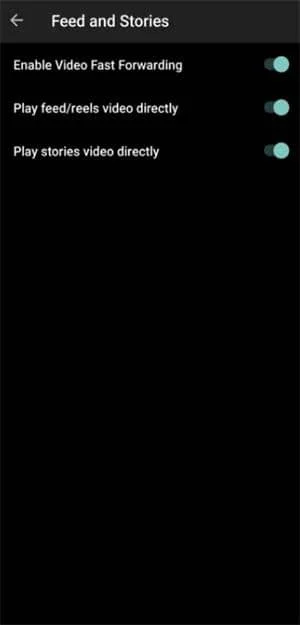
With Insta Thunder, your feed and Reels videos will not show any advertisements.
Customization
Offers more options for theme and icon customization. This lets users adjust the interface to fit their personal preferences. It feels more personal than the official and general versions.
Cons:
Lack of official support
Insta Thunder isn’t an official app. That means it can’t get technical support from Instagram. If you have login problems, see odd behavior, or get banned, Instagram’s customer service can’t help you.
Instability
The stability of third-party modified apps depends on the developer’s maintenance. If the official Instagram updates, Insta Thunder might stop working for a while. You’ll need to update the APK and reinstall it to keep using it. During this period, you may encounter login failures or non-functional features.
Limited Functionality
Although Insta Thunder has added many features, there are still some limitations. The anti-ban feature doesn’t fully stop detection. Users should still follow usage norms. Additionally, the bulk messaging feature, if misused, may be flagged by the system as abuse.
Why Insta Thunder is Popular:
Meets privacy needs
In today’s social networks, users are increasingly concerned about privacy. However, some features of the official Instagram make many people uncomfortable. Insta Thunder lets users hide their status. This makes the experience more private and comfortable.
Feature-rich and practical
Many users think the official Instagram lacks features. They can’t download content, and there are too many ads. Insta Thunder has fixed these issues. It now offers useful features like downloading, ad removal, and high-definition image uploads.
Who Should Use Insta Thunder:
Users who care about privacy
To keep your privacy on Instagram, use Insta Thunder. It hides your read messages and browsing history, so others won’t know when you check stories or messages. The app lock feature keeps others out of your app content. They can’t access it without your permission.
Multi-account managers
Many people have several Instagram accounts and often switch between them. Insta Thunder lets you add multiple accounts and switch between them easily. This feature is great for users managing several accounts.
Users who dislike ad interference
If you find too many ads on Instagram, try Insta Thunder’s ad-free mode. It will improve your browsing experience.
Insta Thunder Screenshots:
Tips for Using Insta Thunder:
Do not let multiple versions coexist
Most Android devices can’t run both the official Instagram and Insta Thunder at once. The two apps have different signatures. This makes the system see them as conflicting programs. Therefore, to switch usage, you must first uninstall the currently installed app.
Reduce abnormal operations
Don’t refresh often, follow too many accounts, or engage in strange behavior. This will help reduce the chances of detection by the official system.
Use sub-accounts
Log in to Insta Thunder with a non-primary account. This helps lower the chance of getting banned for using a third-party mod.
About Insta Thunder APK:
Insta Thunder APK solves problems with too many ads, poor privacy, and hard content downloads on Instagram. It helps users personalize their Instagram experience. You can save friends’ stories or track follower changes. This gives you more freedom and control. Plus, it offers features that the official app doesn’t have.
Benefits of Using Insta Thunder APK:
Privacy protection
Supports hiding message read status, hiding typing indicators, hiding story viewing history, and an app lock feature. Insta Thunder APK completely removes ad content from feeds and Reels.
Media downloading
You can save images, videos, Reels, and Stories easily. Just click the built-in download button to add them to your local albums.
High-definition photo uploads
Allow full-resolution uploads for photos, so there is no quality loss from compression.
Interface customization
You can choose from different theme skins and customize app icons. This lets you change the app’s look to match your style.
Follow reminders
You will receive notifications when someone unfollows you. Insta Thunder APK will keep you informed about changes in your followers.
Multi-account support
Allows for adding and switching between multiple Instagram accounts
How To Install Insta Thunder APK:
- Download the Insta Thunder APK file from this website.
- Enable Install from unknown sources on your device. Go to Settings > Security. Then, check the box to allow apps from unofficial sources.
- After the download finishes, open the file. Then, tap the Install button. Wait for the installation to complete.
- Once installation is done, open Insta Thunder. Log in with your Instagram account and password.
Difference Between Insta Thunder and Insta Pro:
| Feature | Insta Thunder | Insta Pro |
|---|---|---|
| Media Download | ✓ | ✓ |
| Privacy Control | ✓ | ✓ |
| Ad-Free Browsing | ✓ | ✓ |
| Multiple Account Support | ✓ | ✓ |
| Custom Themes and Fonts | ✓ | ✓ |
| Translate Comments and Messages | ✓ | |
| App Lock (PIN) | ✓ | |
| Unfollow Tracking | ✓ | |
| Automated Task Scheduling (Post, Like, Follow) | ||
| AI-Powered Posting | ||
| Filters, Light Adjustments | ||
| Analytics Features (Account Insights) | ✓ |
Frequently Asked Questions About Insta Thunder:
You usually can’t install the official version and Insta Thunder together. They have different signatures. When you install Insta Thunder, you’ll need to uninstall the current Instagram. Therefore, it is usually necessary to uninstall one before installing the other. Avoid trying unusual methods to make both work together. This could cause problems or conflicts with the data.
As a third-party mod application, there is a certain security risk. Download from official channels. Also, limit the use of your main account, this helps reduce the risk of suspension.
Insta Thunder stands out because it has balanced features and quick updates. It offers great improvements in privacy, downloads, and themes. Insta Thunder provides more themes and customization than Insta Pro, Insta Pro 2. It also includes anti-banning features.
No. The Insta Thunder APK saves images and videos to the phone’s storage when downloaded. Uninstalling it will not delete these saved media files. They will remain in your phone’s photo album or file manager.








Leave a Reply